This topic gets political fast, but that is not the point of this post. I’m focused on the IT planning side—what your team should do now so you are not scrambling in late 2026.
I am not a lawyer, and none of this is legal advice. Work with your legal team on organization-specific interpretation.
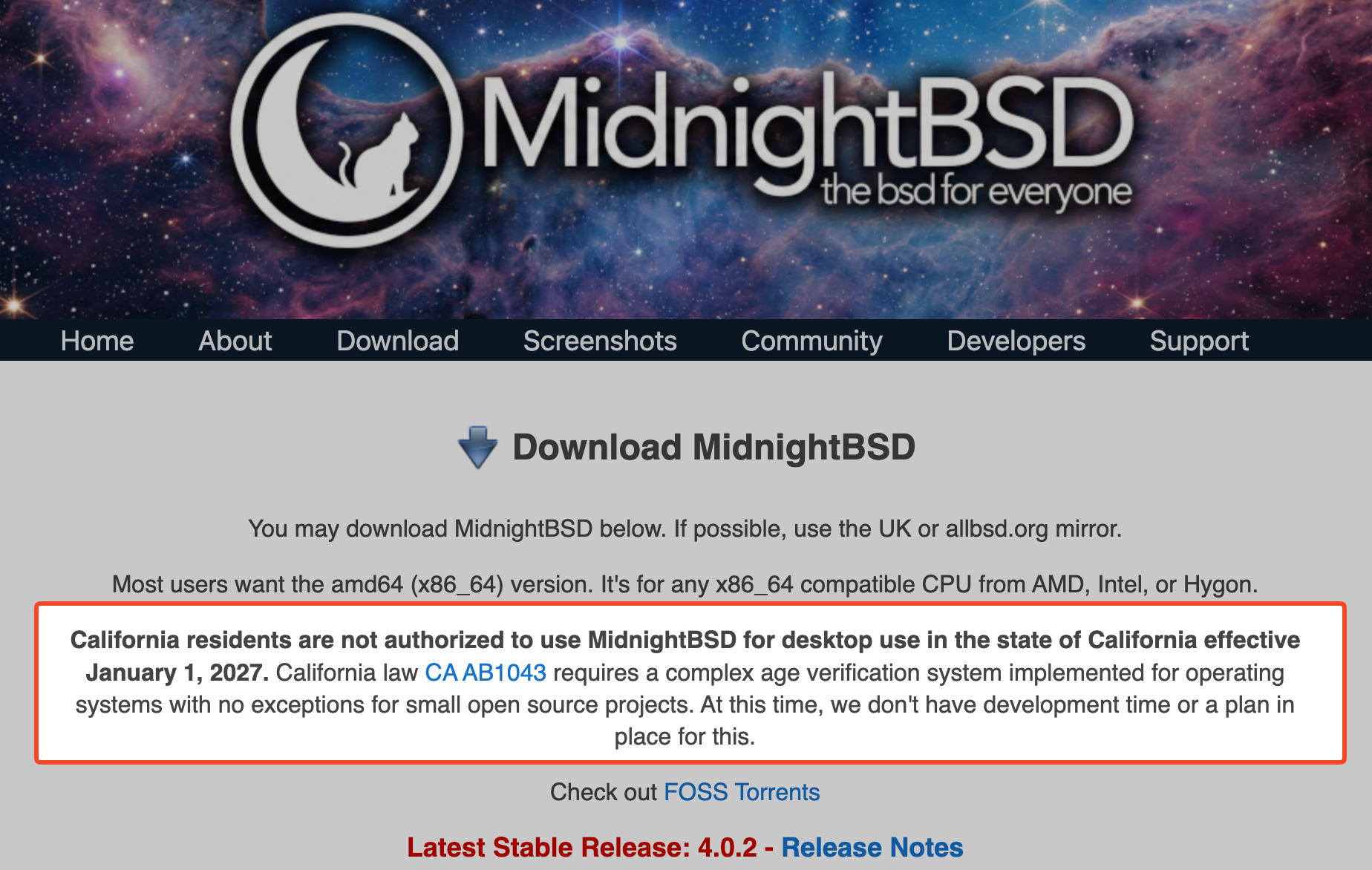
California’s AB1043 is already enacted and goes into effect on January 1, 2027. Colorado’s SB26-051 is moving with a similar structure, New York has parallel proposal activity (S8102/S8102A and A8893), and Illinois has introduced SB3977 with similar OS-level age-assurance concepts. If you manage endpoints in K12, higher ed, SMB, or enterprise, this is relevant to your planning now—even if it does not create immediate direct obligations for every IT admin today.
For FileWave customers, this sits inside UEM planning: onboarding, policy behavior, software behavior, and reporting readiness.
California (AB1043) in plain English
California is moving age checks into OS/account setup and expecting age-range signals to apps.
Core points:
- Age input at setup (birth date, age, or both)
- Standard age buckets (under 13, 13–15, 16–17, 18+)
- Sharing age-range signals with app developers through an API
- Limits on sharing more data than needed
- Penalties for negligent vs intentional violations
There are also transition deadlines in 2027 for devices and apps that were already set up before then.
This is no longer just an app-store issue. It affects endpoint workflows.
Who is directly targeted by AB1043 today?
Based on current California text, the primary duties are placed on:
- operating system providers
- covered app stores
- app developers
For most schools and businesses deploying endpoints, that usually means indirect operational impact rather than being the primary direct target of these provisions. Colorado’s current proposal follows a similar provider/developer-centered model, and the same is broadly true of the parallel proposals now circulating in New York and Illinois.
For admins, the takeaway is simple: know what is in your environment (OS versions, device groups, locations), because if vendor behavior changes—or future law revisions expand scope—you will need to respond quickly. (I am not a lawyer, and none of this is legal advice. Work with your legal team on organization-specific interpretation.)
Is this already global?
Not in this exact form.
California (AB1043) is the enacted OS-level model right now. Colorado (SB26-051) is a similar U.S. bill in motion, New York has similar proposed bills (S8102/S8102A and A8893) in play, and Illinois has introduced SB3977 with a similar OS-level age-assurance structure.
Also relevant: several states have enacted app-store-focused age-assurance laws, which are related but not the same as the OS-level California model. Key examples are Utah (SB142), Texas (SB2420), and Louisiana (HB570).
These app-store-focused laws generally require app store operators to do things like:
- verify or categorize user age at account creation,
- handle parental consent for minors before certain app actions,
- share age-category/consent-related signals with developers,
- apply data-handling limits around minors and age-related data.
Why this matters to IT admins (even if direct duty is often on stores/developers):
- Apple VPP / Apps and Books: managed app assignment workflows may need to account for new store-side age/consent behavior, especially in mixed or BYOD contexts.
- Android EMM / Managed Google Play: similar risk that store/account-side age or consent logic changes app availability or deployment behavior.
- Windows + WinGet: these laws are often mobile-app-store-centered, so direct impact may be lower today, but Microsoft ecosystem policy changes could still affect enterprise app distribution patterns over time.
Timing impact to watch (important: enacted does not always mean fully in-force on the same date):
- Texas SB2420: generally cited as effective January 1, 2026.
- Utah SB142: enacted, with implementation timelines in 2026.
- Louisiana HB570: enacted, with 2026 effective timing.
Outside the U.S., there are active child-safety and age-check rules (UK, Australia, EU initiatives), but those are usually focused on platforms/services, not a direct copy of California’s OS-account-setup model.
For quick context:
- UK: Online Safety Act program and enforcement timeline (GOV.UK / Ofcom)
https://www.gov.uk/government/collections/online-safety-act
https://www.ofcom.org.uk/online-safety/illegal-and-harmful-content/age-assurance - Australia: social media age restrictions framework (eSafety Commissioner)
https://www.esafety.gov.au/about-us/industry-regulation/social-media-age-restrictions
What vendors are saying (and not saying)
The open-source ecosystem is already discussing implementation options in public.
One example: Ubuntu community discussion around possible interface patterns, with Canonical reportedly saying it is reviewing the law with legal counsel and has no committed implementation plan yet (reported by 9to5Linux).
As quoted by 9to5Linux from Canonical VP Engineering Jon Seager:
“Canonical is aware of the legislation and is reviewing it internally with legal counsel, but there are currently no concrete plans on how, or even whether, Ubuntu will change in response… none have been adopted or committed to by Canonical.”
Source: https://9to5linux.com/ubuntu-fedora-linux-mint-eye-age-verification-amid-california-law-backlash
Critics have raised a valid concern here: if an age-attestation system exposes a user’s age bracket too broadly, it may create a new safety and privacy risk instead of reducing one. That matters even more in K12 and other environments where minors are part of the managed population.
As Carl Richell, founder and CEO of System76, the Linux PC maker, put it:
“Perhaps the most perverse consequence of age verification laws: many require advertising the age bracket of the user to the open web. Children will be known to be children even to those that would exploit that information without regard for any other ‘safety’ law.”
Source: https://x.com/carlrichell/status/2029721815573262344
This is a real concern, not a minor complaint. Some versions of these bills could end up harming the very children they claim to protect if they expose child-status signals too broadly. If a system effectively tells websites, apps, or intermediaries that a user is under 13 or otherwise a minor, that creates its own privacy and safety risk and raises legal questions organizations should take seriously.
This may still move. In a later post, Carl Richell, founder and CEO of System76, the Linux PC maker, said he met with Colorado Senator Matt Ball, co-author of SB26-051, and that excluding open source software from the bill “appears to be a real possibility.” He also said amendments are expected for California’s age-attestation bill. That is not the same as enacted bill text, but it does suggest the scope and implementation details are not settled yet.
Source: https://x.com/carlrichell/status/2031125624711164182
What we have still not seen publicly, at least as of this writing:
- A formal, detailed Apple implementation roadmap tied specifically to AB1043
- A formal, detailed Microsoft implementation roadmap tied specifically to AB1043
- A clear Google AB1043-specific implementation statement (Google has broader age-assurance policy content, but no clear AB1043-specific rollout statement found publicly)
That could change. For now, admins should assume details may shift. This is likely to affect iPads, iPhones, Android, and Chromebooks too—it is not just macOS and Windows. Apple TV may also be affected depending on how vendor and app-store implementation lands.
Why this matters for FileWave admins
Even if these laws do not create an immediate direct obligation for every admin today, this is still day-to-day UEM planning work:
- Enrollment and first-run setup: You may need to adjust setup workflows, enrollment sequencing, and onboarding documentation.
- Policy behavior by user or location: Different rules may apply based on where users are located, so policy targeting becomes more important.
- App behavior differences: Apps may respond differently to age-range signals, which can create inconsistent user experiences.
- Version-floor pressure from OS vendors: Even if admins are not the direct legal target, Apple/Microsoft/Linux vendors may implement required behavior only on newer versions, which can force upgrade planning for older macOS/Windows/Linux endpoints.
- App store workflow changes: If app stores change gating or metadata requirements, IT admins may need new steps for managed app deployment workflows (including Apple VPP in Apple environments).
- Support tickets when behavior changes: As prompts, deployment flows, and app behavior change, help desk volume usually goes up at first.
- Compliance/reporting conversations with leadership and legal: Teams will likely be asked what changed, what was deployed, who is affected, and what risk remains.
- Appliance planning visibility: FileWave admins should also track current Debian appliance guidance for Server/Booster/IVS, since this topic may influence server-side planning over time.
If you own endpoint operations, this lands on your team.
Related appliance advisory: https://kb.filewave.com/link/1124
What this looks like by market
K12
K12 will likely feel this first because districts often have shared devices, strict policy requirements, and parent/guardian communication expectations.
Main pressure points:
- Shared-device consistency: One iPad cart can be used by many students. If setup/account assumptions are wrong, behavior may look inconsistent from class to class.
- Student lifecycle changes: A student can move grades, schools, or enrollment status. Admins need a clean process for keeping device/account state accurate over time.
- Parent/guardian communication load: Help desk and school admins may need plain-language answers for families about why setup prompts changed.
- District audit documentation: District leaders and compliance teams may ask for clear records showing policy settings, exceptions, and remediation steps.
Higher Ed
Higher ed usually has mixed populations and mixed ownership models, so policies are harder to apply uniformly.
Main pressure points:
- Minors + adult learners in one environment: Universities can have dual-enrollment minors and adult students at the same time, which complicates one-size-fits-all policy decisions.
- BYOD + managed labs: Campus IT may fully manage lab devices but have limited control on personal laptops/phones, creating split workflows.
- Store/deployment workflow divergence: Managed app deployment (including Apple-managed app models) may not behave exactly like user-driven installs, so higher-ed teams should test both paths.
- Cross-team coordination: Central IT, legal/privacy, student services, and departmental IT may all need aligned messaging and escalation paths.
SMB / MSP
SMBs and MSPs often have lean teams and need practical steps, not giant policy projects.
Main pressure points:
- Limited staff for proactive planning: A 1–3 person admin team still has day jobs. Planning work has to be small, scheduled, and realistic.
- Dependence on vendor timing: Smaller teams rely heavily on OS/vendor guidance and may not have resources to engineer custom controls early.
- Older-version risk: If required behavior lands only in newer releases, small teams can get stuck supporting older OS versions that become harder to keep compliant operationally.
- Client communication: MSPs especially need clear scripts for “what changed, who is affected, and what we’re doing next” to avoid confusion.
Enterprise
Enterprise environments can handle complexity, but only when ownership is explicit and cross-team handoffs are clear.
Main pressure points:
- Multi-state policy differences: One company policy may not fit every location, so teams need location-aware controls and exception handling.
- Governance/accountability gaps: If ownership is vague, teams can spend months debating scope instead of shipping a plan.
- Approval chain confusion: IT, Security, Legal, Privacy, and HR may all be involved. Define decision rights early so rollout doesn’t stall.
- Reporting expectations: Leadership usually wants regular status, risk, and readiness updates—not just technical details.
A practical 2026 prep checklist
Run this like a real project with owners, dates, and deliverables. If you were around for Y2K, the planning pattern will feel familiar: it may not affect every device the same way, details will shift as vendors publish updates, and the teams paying attention early will avoid a lot of preventable pain later. Also assume this is probably a v1 law story—future revisions could change the obligations, so it is worth staying on top of it even if the immediate work looks small.
1) Build your exposure inventory (owner: Endpoint Ops)
Actions:
- Pull a device report by state/location (start with CA; keep CO, NY, and IL on watch).
- Tag devices by platform (Windows, macOS, iOS/iPadOS, Android, ChromeOS, Linux).
- Split devices into groups: student, staff, faculty, employee, contractor, shared lab/kiosk.
- Mark ownership type: org-owned, BYOD, mixed.
Deliverable: One-page summary with counts by state + platform + device/user group.
2) Assign ownership in writing (owner: IT leadership)
Actions:
- Assign one clearly responsible owner for each area:
- Legal interpretation
- Technical implementation
- Help desk readiness
- Compliance reporting
- Set a weekly 30-minute check-in until the baseline plan is done.
Deliverable: A simple Responsibility Assignment Matrix (RACI) — who is Responsible, Accountable, Consulted, and Informed — with actual names, not just role titles.
3) Document today’s workflows (owner: UEM/MDM admin)
Actions:
- Write current-state flow for each major OS:
- first boot
- account setup
- enrollment
- app install path
- policy assignment
- Mark where age-related logic could change behavior.
- List shared-device edge cases and exceptions.
Deliverable: One diagram per major OS + edge-case list.
4) Start a vendor tracker (owner: platform leads)
Actions:
- Create a tracker with columns: Vendor, Source link, Date, Change, Impact, Action.
- Watch official sources first (release notes, product docs, trust/safety updates).
- Track Linux ecosystem updates separately (distros, stores, desktop environments).
Deliverable: Living tracker updated at least every 2 weeks.
5) Build the support playbook now (owner: Service Desk manager)
Actions:
- Draft Tier 1 scripts for likely tickets:
- “Why is this app behaving differently?”
- “Why am I being asked for age info?”
- “What if setup info is wrong?”
- Define when Tier 1 should escalate to Tier 2, endpoint engineering, or legal.
- Build internal FAQ + user-facing FAQ.
Deliverable: Help desk playbook + 10-question FAQ.
6) Define compliance evidence early (owner: Security/Compliance)
Actions:
- Decide what “proof you are prepared” means in your org. For new admins, here’s what each item usually means:
- Policy assignment evidence: reports/screenshots/export data showing which policies are assigned to which device/user groups, and when those assignments changed.
- Baseline configuration reports: proof of the expected default settings (for example, security/profile/settings baselines) and whether endpoints match that expected state.
- Approved exceptions: a simple record of any approved deviations (who approved, why, for which devices/users, and expiration/review date).
- Incident/ticket trend reporting: help desk and incident trends showing whether related issues are increasing, stable, or resolved over time.
- Set retention expectations for logs and reports (for example: where stored, who can access, how long kept).
- Confirm with legal/privacy that you are only collecting the minimum data needed.
Deliverable: Evidence checklist used in monthly readiness reviews.
7) Run one controlled pilot (owner: Endpoint engineering)
Actions:
- Pick a low-risk test group (internal IT devices or one small department).
- Test onboarding, enrollment, app access, managed app deployment flows (including Apple-managed app paths where relevant), and support escalation end-to-end.
- Capture failures, user confusion points, and doc gaps.
Deliverable: Pilot report with a “fix before broader rollout” list.
8) Prepare stakeholder communications (owner: IT leadership/comms)
Actions:
- Build a one-slide summary: what changed, who is impacted, current risk, next milestone.
- Pre-draft messages for internal teams and, where relevant, parents/customers/faculty.
- Keep language neutral and operational.
Deliverable: Approved message pack (internal + external templates).
9) Set a simple timeline and stick to it (owner: PM/IT ops)
Actions:
- Set checkpoints (example):
- Q2: inventory + ownership complete
- Q3: support playbooks + evidence model complete
- Q4: pilot complete + revisions done
- Pre-2027: final readiness review
Deliverable: Published timeline with milestone owners and dates.
FileWave-specific note: inventory, appliances, and OS upgrade pressure
For FileWave admins, we also published a short appliance advisory here:
https://kb.filewave.com/link/1124
That advisory covers current guidance for FileWave Server, Booster, and IVS on Debian. Right now this is a monitor-and-prepare topic, not a confirmed appliance-impact event for current servers.
From the current law text, a school/business deploying a Debian-based FileWave appliance is generally not the primary direct target category of these age-signal provisions by itself.
From the bill text, this law does not directly say every organization must upgrade every endpoint.
The question to keep front and center is: Will required behavior only be available on newer OS versions?
If OS vendors deliver compliance behavior only on newer versions, older builds can become a practical risk. That creates upgrade pressure in practice, even when the legal text is aimed at OS providers and app developers.
For FileWave environments, a smart move is:
- Use FileWave inventory to map OS versions and identify older macOS/Windows versions in impacted populations.
- Group devices into risk tiers (current, near-EOL, legacy).
- Track vendor implementation details to see which versions get required behavior.
- Plan targeted upgrades where needed instead of blanket upgrades.
Also important: many organizations have Linux devices in the mix.
FileWave does not currently manage Linux endpoints today, but Linux support is under consideration. Customers who want Linux inventory/management can vote and comment here:
https://innovate.filewavex.org/posts/66/linux-client-support
Example: Starter Help Desk FAQ (copy/paste)
Use this as a base and customize to your environment.
- Why is the device asking for age/date of birth during setup?
Some laws and platform requirements now use age brackets to apply child-safety settings. The prompt is part of setup flow. - What age data is actually being used?
Typically an age bracket (for example: under 13, 13–15, 16–17, 18+), not broad personal profile data shared everywhere. - Can users skip this prompt?
Depends on OS/vendor behavior and org policy. In some cases no, in others there may be defer options. - What if the wrong age was entered?
Open a support ticket. IT can guide correction steps or escalate to account/platform admins. - Why does one app behave differently than another?
Different apps may consume age signals differently and apply different defaults or restrictions. - Is this only for schools?
No. It can affect K12, higher ed, SMB, and enterprise depending on location, platform, and policy. - Does this apply outside California?
Yes. California is the clearest enacted OS-level model right now, but Colorado, New York, and Illinois are all relevant watch states, and other regions may use related rules with different methods. - Are we storing sensitive age data in UEM?
Keep this simple: collect the minimum data needed, and document what is collected, where it is stored, and why. - Who should I contact if this blocks onboarding?
Start with Service Desk Tier 1. If needed, escalate to endpoint engineering, identity, or legal using your help desk playbook. - What should admins do right now?
Inventory impacted users/devices, assign owners, test setup flows, and run a small pilot before broad rollout.
If you’re a smaller team, do this minimum version
If you only have a few admins, start here. Do the basics well:
- Inventory CA users/devices
Make a basic list of users and devices that could be affected (at minimum: device name, OS/version, location, owner/team). - Assign one owner
Pick one person to own the plan and updates so work does not stall. This person can coordinate others, even in a small team. - Build a basic help desk FAQ
Write short answers to the top user questions your team expects (new setup prompts, app behavior differences, who to contact). - Track vendor updates weekly
Set one recurring calendar reminder each week to check official FileWave/OS vendor updates and note anything that changed. - Run one pilot and document outcomes
Test with one small, low-risk group first. Write down what worked, what broke, and what support questions came in.
That alone will put you ahead of most teams.
Final thought
The legal duties may start with platform providers, app stores, and developers, but the operational fallout still lands on endpoint teams. California AB1043 is date-bound, Colorado SB26-051 is moving, New York proposals are active, Illinois SB3977 is now on the watch list, and app-store-focused laws in other states are enacted or entering force in 2026. Expect added complexity in managed app distribution (Apple VPP/Apps and Books, Managed Google Play, and potentially broader Windows ecosystem workflows), policy exceptions, and support processes. The smart move is to know what is in your environment, assign ownership, prepare support and communications now, and keep updating the plan as the facts and vendor implementations change.
Sources
- Law references (official):
- California AB1043 bill text: https://leginfo.legislature.ca.gov/faces/billTextClient.xhtml?bill_id=202520260AB1043
- California AB1043 bill status: https://leginfo.legislature.ca.gov/faces/billStatusClient.xhtml?bill_id=202520260AB1043
- Colorado SB26-051 bill status: https://leg.colorado.gov/bills/SB26-051
- New York S8102A bill page: https://www.nysenate.gov/legislation/bills/2025/S8102/amendment/A
- New York A8893 bill page: https://www.nysenate.gov/legislation/bills/2025/A8893
- Illinois SB3977 bill status: https://www.ilga.gov/ftp/legislation/104/BillStatus/HTML/10400SB3977.html
- Illinois SB3977 full text: https://www.ilga.gov/Legislation/BillStatus/FullText?GAID=18&DocNum=3977&DocTypeID=SB&LegId=167475&SessionID=114
- Utah SB142 bill page: https://le.utah.gov/~2025/bills/static/SB0142.html
- Texas SB2420 enrolled bill text: https://capitol.texas.gov/tlodocs/89R/billtext/pdf/SB02420F.pdf
- Louisiana HB570 enrolled bill text: https://www.legis.la.gov/legis/ViewDocument.aspx?d=1425304
- Ubuntu/Fedora/Linux Mint discussion coverage (9to5Linux): https://9to5linux.com/ubuntu-fedora-linux-mint-eye-age-verification-amid-california-law-backlash
- UK Online Safety Act collection (official): https://www.gov.uk/government/collections/online-safety-act
- Ofcom age-assurance duties (official): https://www.ofcom.org.uk/online-safety/illegal-and-harmful-content/age-assurance
- Australia social media age restrictions (official): https://www.esafety.gov.au/about-us/industry-regulation/social-media-age-restrictions
- FileWave Linux client support idea/voting thread: https://innovate.filewavex.org/posts/66/linux-client-support